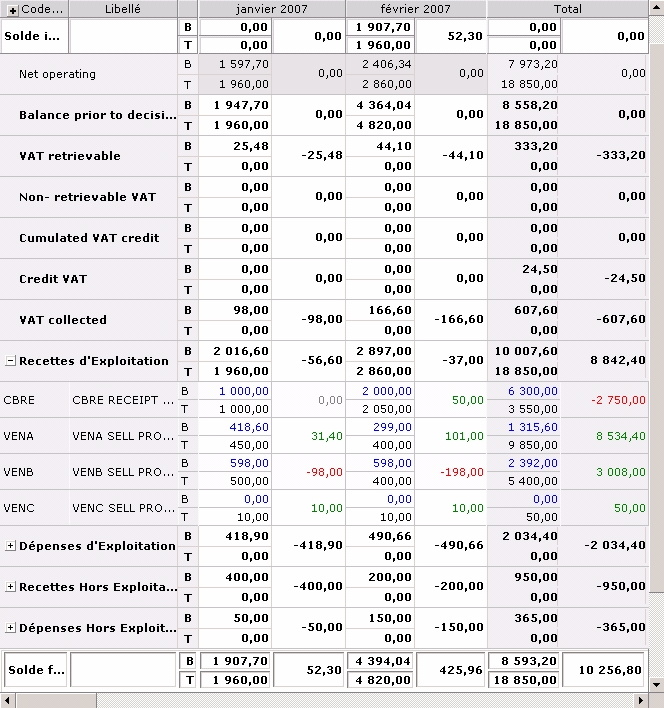
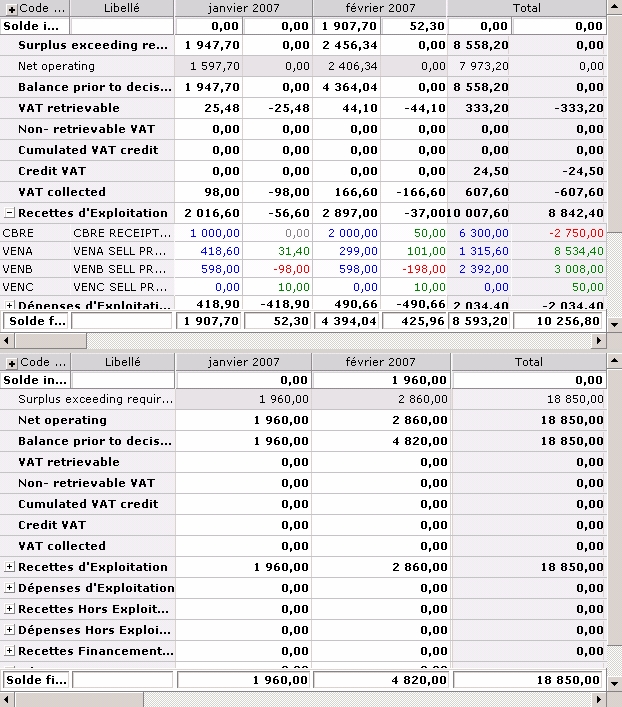
The Budget Analysis mode enables you to view and defer the discrepancies between the Treasury Budget and the flows saved in Cash.
Analysis enables you to roll Non-actual Forecasts.
The budget sheet is displayed in analysis mode when you select this mode in the budget sheet filter.
Info
The discrepancy between Forecasts and Actuals is null over the mixed budget period if, since the last actuals import, no cash flow was created nor modified in Cash for the dates, company and budget codes involved in the budget exercise. For more information on Mixed Budgets, see the Importing Actuals procedure.
For more information on:
- the setup options of the Analysis Mode (display of the budget and discrepancy with the flows of the Cash module), see topic Budget Sheet Entry and Analysis,
- the display filter options (companies, period steps, etc.), see topic Display Filters,
- The rolling of discrepancies, see topic Rolling Non-actual Forecasts,
- the activation of the analysis mode, click here.
 Showing or Hiding Discrepancies
- In the budget sheet, click the Change button in the Filters toolbar.
The setup page for the selected filter is displayed.
- Click on the View tab.
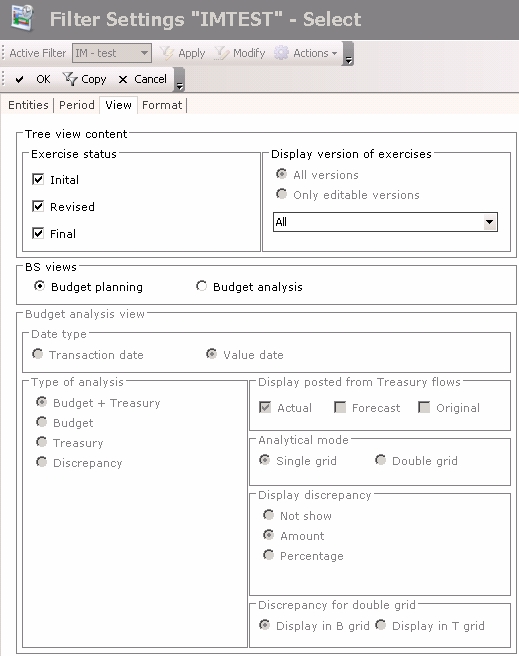
- In the BS views area, select the Budget Analysis option.
The fields of the area (specific to the budget analysis) are enabled. - In the Display Discrepancy area, enable the option:
- Not show not to display the discrepancy (this option is disabled when the Discrepancy option is not selected in the Type of Analysis area),
- Amount to display the discrepancy amount,
- Percentage to display the discrepancy percentage.
- If you chose to view the Treasury Budget and the flows saved in the Cash module in two different sheets (enable Budget + Treasury and Double Grid options in the Type of Analysis and Budget Analysis areas), select one of the following options in the Discrepancy for Double Grid:
- Display in B grid to display the discrepancy in the Treasury Budget (grid on top),
- Display in T grid to display the discrepancy in the sheet of the flows saved in the Cash module (grid at the bottom).
Once you completed the modifcations, in the action bar at the top of the page, click:
- Save to save your modifications without leaving the current page,
- OK to save your modifications and go back to the previous page,
- Cancel to cancel your modifications and go back to the previous page.
For more information on:
- the setup options of the Analysis Mode (display of the budget and discrepancy with the flows of the Cash module), see the topic Budget Sheet Entry and Analysis,
- the display filter options (companies, period steps, etc.), see topic Display Filters.
Showing or Hiding Treasury Budget or Flows saved in the Cash Module
- In the budget sheet, click the Change button in the Filters toolbar.
The setup page for the selected filter is displayed.
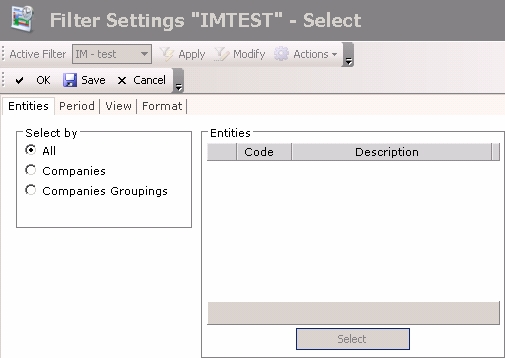
- Click on the View tab.
- In the BS views area, select the Budget Analysis option.
The fields of the area (specific to the budget analysis) are enabled. - In the Type of Analysis area, enable the option:
- Budget + Treasury to display the Treasury Budget and the flows saved in the Cash module,
- Budget to display only the Treasury Budget,
- Treasury to display only the flows saved in the Cash module,
- Discrepancy to show only discrepancies and hide the Treasury Budget and the flows saved in the Cash module.
- If you chose to view the Treasury Budget and the flows saved in the Cash module, enable one of the following options in the Analysis Mode area:
- Single Grid to display a single sheet (the Treasury Budget amounts are above the flows saved in the Cash module),
- Double Grid to display two sheets with the Treasury Budget and the flows saved in the Cash module in two different sheets.
- In the Display Discrepancy area, enable the option:
- Not show not to display the discrepancy (this option is disabled when the Discrepancy option is not selected in the Type of Analysis area),
- Amount to display the discrepancy amount,
- Percentage to display the discrepancy percentage.
- If you selected the double grid and the display of the discrepancy (enabled Amount or Percentage options in the Display Discrepancy area), enable one of the following options in the Discrepancy for Double Grid area:
- Display in B grid to display the discrepancy in the Treasury Budget,
- Display in T grid to display the discrepancy in the sheet of the flows saved in the Cash module.
Once you completed the modifcations, in the action bar at the top of the page, click:
- Save to save your modifications without leaving the current page,
- OK to save your modifications and go back to the previous page,
- Cancel to cancel your modifications and go back to the previous page.
For more information on:
- the setup options of the Analysis mode, see topic Budget Sheet Entry and Analysis.
- the display filter options, see topic Display Filters.